


Page 12 - Paycor Connect User Guide
P. 12
ADMIN ONLY - REPORTS
12
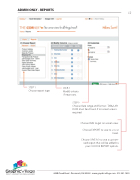
            STEP 1
Choose report type.
STEP 2
Modify criteria
if necessary.
STEP 3
Choose date range and format - TABULAR DATA must be chosen if on screen view is required.
Choose RUN to get on screen view.
Choose EXPORT to save to .csv or Excel.
Choose SAVE AS to save a custom- ized report that will be added to your CHOOSE REPORT options.
                  4440 Creek Road . Cincinnati, OH 45242 . www.graphicvillage.com . 513.241.1865


