


Page 7 - Paycor Connect User Guide
P. 7
CURRENT ORDER - SHIPPING
7
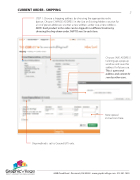
 STEP 1: Choose a shipping address by choosing the appropriate radio button. Choose CHANGE ADDRESS in the Use an Existing Address section for a list of preset addresses or enter a new address under Use a New Address. NOTE: Each product in the order can be shipped to a different location by choosing the drop down under SHIP TO next to each item.
    Choose SAVE ADDRESS to bring up a pop up window and save the address for future use. This is a personal address and cannot be seen by other users.
         Note special instructions here.
  Ship method is set to Ground UPS only.
                 4440 Creek Road . Cincinnati, OH 45242 . www.graphicvillage.com . 513.241.1865


