


Page 5 - Paycor Connect User Guide
P. 5
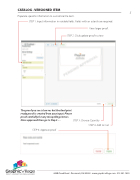
CATALOG - VERSIONED ITEM
Populate specific information to customize the item.
STEP 1. Input information in variable fields. Fields with an asterisk are required.
View larger proof. STEP 2. Click update proof to view.
5
            The proof you see is low res but the final print ready proof is created from your input. Please proof carefullly for any misspellings/errors. Once approved then go to Step 3 ....
STEP 5: Approve proof
STEP 3: Choose Quantity
STEP 4: Add to Cart
                    4440 Creek Road . Cincinnati, OH 45242 . www.graphicvillage.com . 513.241.1865


